
 Tiếng Việt
To check OKX cashback balance, users should log in to their OKX account and review the relevant Rewards Center, Pay account, Funding account, campaign page, or referral dashboard depending on the type of cashback they joined. The exact location may vary because OKX cashback can come from card spending, trading rebates, referral rewards, or promotional campaigns.
In addition, OKX cashback rewards may appear as pending, credited, available, or locked, so users should not assume the reward is missing immediately. Some cashback needs review, campaign confirmation, or manual claiming before it becomes usable.
Moreover, this guide from CashbackCoin explains how to track OKX cashback rewards, understand payout status, and avoid confusion between cashback, rebate, bonus, voucher, and locked reward. Below, you will learn the full checking process step by step.
Contents:
How to Check OKX Cashback Balance Step by Step
You can check OKX cashback balance by reviewing your OKX app, desktop account dashboard, reward history, and payout status in the correct cashback-related section.
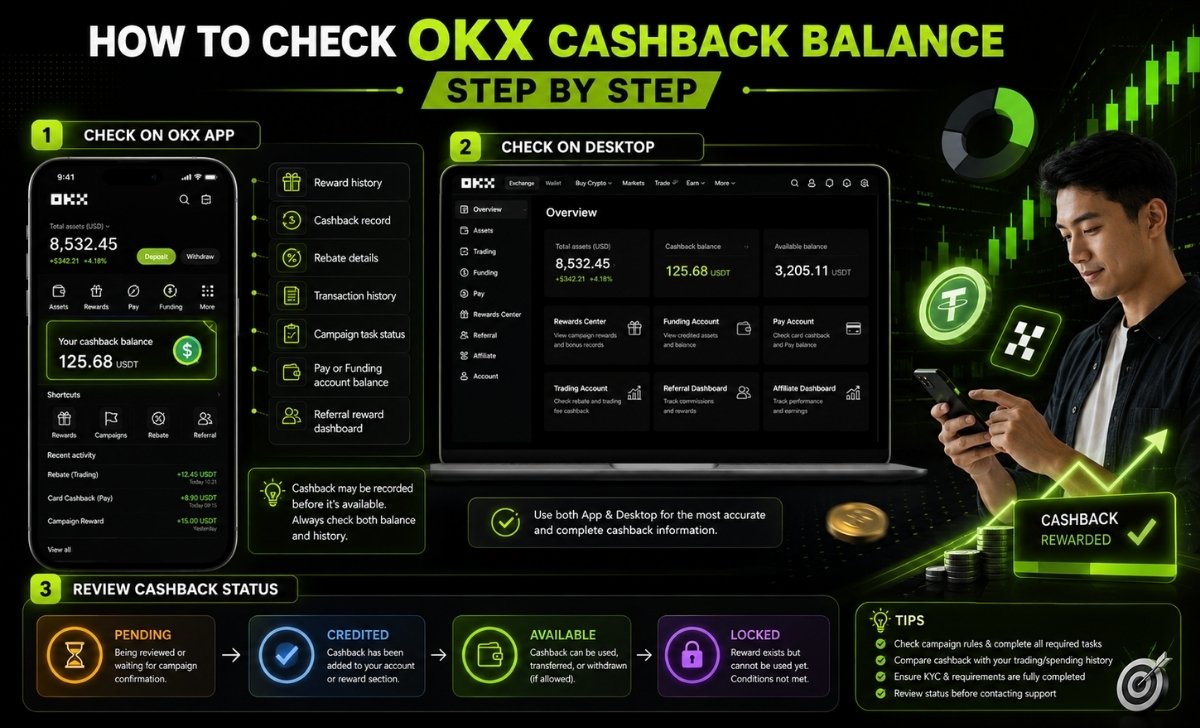
To make the process easier, users should first identify which type of cashback they expect to receive. Cashback from OKX Card, referral programs, campaign rewards, and trading rebates may not appear in the same place.
Check OKX Cashback Balance on the OKX App
Checking OKX cashback balance on the OKX app is usually the fastest option because most reward, asset, and transaction sections are accessible from the mobile dashboard.
First, open the OKX app and log in to the correct account. This step matters because cashback is linked to the account that joined the campaign, used the referral code, completed the eligible trade, or activated the OKX Card feature.
Next, go to sections such as Assets, Rewards Center, Pay, Funding, or the campaign page related to your cashback offer. If you joined a specific promotion, the cashback may appear under that campaign instead of your main balance.
After that, check the following areas carefully:
- Reward history
- Cashback record
- Rebate details
- Transaction history
- Campaign task status
- Pay or Funding account balance
- Referral reward dashboard
For example, if the cashback comes from a card spending program, it may be linked to the Pay account. If the cashback comes from trading fee rebates, it may appear in a rebate or commission-related section. If the cashback comes from a campaign, you may need to open the campaign page and review your task completion status.
CashbackCoin recommends checking both the visible balance and the reward history because some cashback may be recorded before it becomes available for use. This helps users avoid the common mistake of thinking the cashback has disappeared when it is actually pending review.
Users who want to understand how to get OKX cashback should review the campaign rules, complete the required tasks, and confirm the reward status before the payout period ends.
Check OKX Cashback Balance on Desktop
Checking OKX cashback balance on desktop is useful when users want a wider view of account activity, reward records, and transaction details.
To start, visit the official OKX website and log in to the same account used for the cashback activity. Then review the account dashboard and look for sections related to Rewards Center, Assets, Funding, Pay, Referral, or Affiliate.
On desktop, users should inspect these areas:
- Account dashboard for general balance updates
- Rewards Center for campaign rewards and bonus records
- Funding account for credited assets
- Pay account for OKX Card-related cashback
- Trading account for rebate-related activity
- Referral or affiliate dashboard for partner-based rewards
If your cashback comes from a referral or affiliate program, the referral dashboard is especially important. This area may show whether the referral code was tracked, whether commission was generated, and whether the reward is still pending.
Users should also compare the expected cashback with their trading or spending history. If there is no eligible trade, no qualified transaction, or no campaign enrollment record, the cashback may not be generated.
In practice, the desktop version is helpful for reviewing detailed transaction records, while the app is better for quick checks. CashbackCoin suggests using both when the cashback balance does not appear in the first place you check.
Review Cashback Status: Pending, Credited or Available
Reviewing cashback status is essential because OKX cashback balance may not always become available immediately after the user completes an action.
There are four common statuses users should understand:
- Pending: The cashback is being reviewed or waiting for campaign confirmation.
- Credited: The cashback has been added to the account or reward section.
- Available: The cashback can be used, transferred, or withdrawn if the program allows it.
- Locked: The reward exists but cannot be used yet because conditions are not fully met.
For example, cashback may become pending after a qualifying trade but only become credited after the campaign settlement period. In another case, a reward may appear as locked if the user has not completed KYC, reached the required trading volume, or passed the reward unlock period.
This status check is important because many users confuse “not received” with “not yet available.” A pending or locked cashback record means the system has recognized activity, but the user may still need to wait or complete additional requirements.
CashbackCoin advises users to review the reward status before contacting support or assuming the cashback has failed. A clear status check saves time and helps users identify whether the issue is payout timing, missing eligibility, or incorrect account tracking.
After you understand how to check the balance, the next step is knowing where OKX cashback rewards may actually appear inside your account.
Where to Find OKX Cashback Rewards in Your Account
OKX cashback rewards can appear in several account areas, including Rewards Center, campaign pages, Pay account, Funding account, Trading account, referral dashboard, or affiliate dashboard.
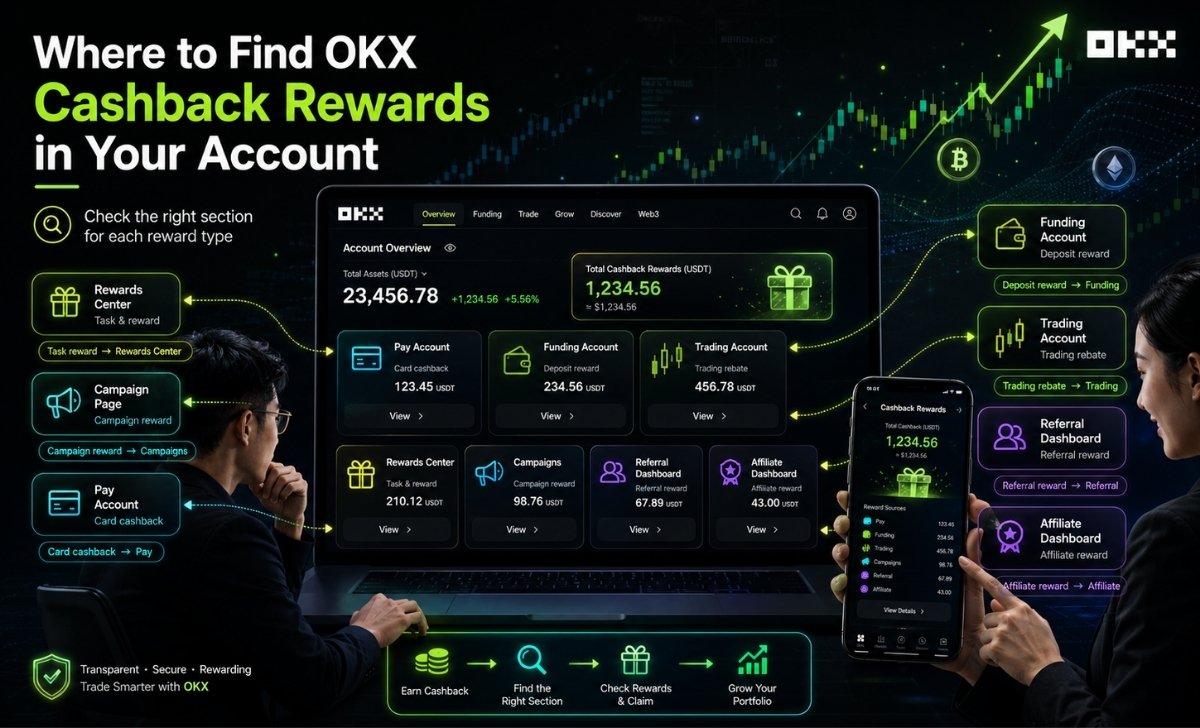
Because different cashback types follow different reward systems, users should not check only the main wallet balance. Instead, they should review the section connected to the cashback source.
Rewards Center and Campaign Page
Rewards Center and campaign pages are common places to find OKX cashback rewards related to tasks, promotions, and special user campaigns.
In many cases, users join an OKX campaign by completing tasks such as registering, depositing funds, trading a required amount, activating a product, or spending with a card. After completing these tasks, the reward may be displayed in the campaign area before it appears in the available account balance.
Users should check the following details inside Rewards Center or the campaign page:
- Campaign name
- Participation status
- Completed tasks
- Unfinished tasks
- Reward history
- Cashback amount
- Claim button, if available
- Campaign terms and payout period
For example, if a campaign requires users to trade a minimum volume before receiving cashback, the reward may not appear until the system confirms that the trading requirement has been completed. If the campaign requires manual claiming, the user may need to click “Claim” before the cashback becomes available.
This is why Rewards Center should be one of the first places to check. It helps users confirm whether the cashback was generated, whether the task was completed, and whether the reward is waiting for manual action.
CashbackCoin recommends reading the reward conditions carefully because some rewards are time-limited. If the user completes a task after the campaign deadline, the cashback may not be credited.
Pay Account, Funding Account or Trading Account
OKX cashback may appear in the Pay account, Funding account, or Trading account depending on the type of cashback program.
A Pay account is often relevant when cashback is connected to OKX Card or payment-related activity. A Funding account may be used when cashback becomes an available asset. A Trading account may be relevant when cashback comes from trading rebates or fee-related rewards.
This structure helps users avoid checking the wrong place. For instance, a user expecting card cashback may not find it in the trading account because the cashback may be connected to the Pay account. Similarly, a referral rebate may not show in the general reward page if it is tracked through a referral dashboard.
Users should also remember that some rewards are not the same as withdrawable assets. A voucher, bonus, or trial fund may have usage restrictions, while credited cashback may become available for transfer or withdrawal depending on the program.
CashbackCoin suggests checking account sections in this order: Rewards Center, Pay account, Funding account, Trading account, and referral dashboard. This order covers most common cashback sources without wasting time.
Referral or Affiliate Dashboard
Referral or affiliate dashboard is the most relevant section when OKX cashback comes from referral links, invitation codes, partner campaigns, or trading fee commission sharing.
In referral-based cashback, the system needs to track whether the user registered through the correct link or entered the correct referral code. If the tracking failed during registration, the cashback may not appear even if the user later completes trading activity.
Users should check whether:
- The referral code was applied correctly
- The referral link was used before account registration
- The referred account completed required actions
- Trading volume was generated after referral tracking
- Commission or rebate has been calculated
- Cashback is pending, credited, or available
- Minimum payout requirements have been met
This section is especially important for users who joined OKX through an Introducing Broker, affiliate partner, or cashback platform. In these cases, cashback may depend on commission sharing rules rather than a standard OKX campaign.
If the referral dashboard shows no activity, users should review whether they joined the correct program. If the dashboard shows pending commission, the cashback may still be waiting for settlement.
CashbackCoin recommends keeping screenshots of referral codes, campaign pages, and reward status. These records can help users verify their eligibility if cashback is delayed or missing.
Once users know where rewards may appear, the next important question is how OKX cashback payout works and when the reward can be used.
How OKX Cashback Payout Works
OKX cashback payout works by checking eligibility, confirming activity, calculating the reward, crediting it to the correct section, and making it available if all conditions are satisfied.
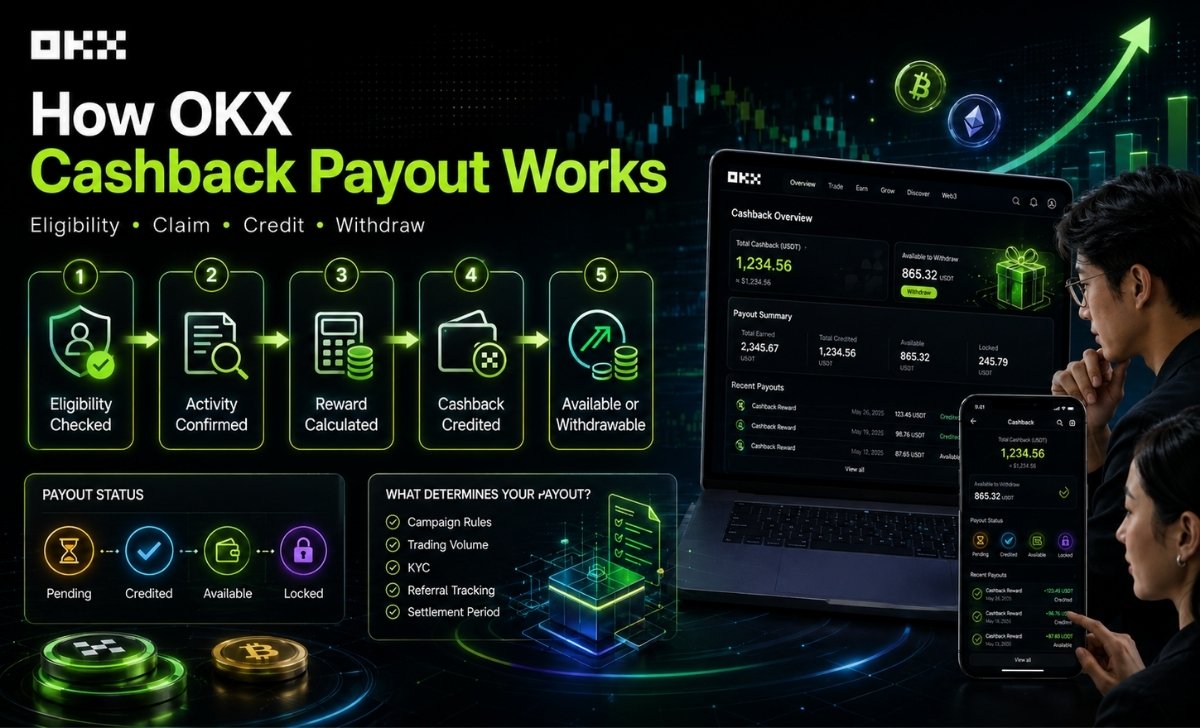
The payout process may differ by cashback type, so users should review the specific rules of the campaign, referral program, card reward, or trading rebate they joined.
When OKX Cashback Is Paid
OKX cashback is usually paid after the system confirms that the user has met the required conditions for the specific reward program.
The payout timing can depend on several factors:
- Type of cashback program
- Campaign settlement period
- Trading volume requirement
- Card spending confirmation
- Referral tracking status
- KYC completion
- Regional eligibility
- Reward cap or maximum limit
- Manual review requirements
For example, a trading rebate may need time for fee calculation and settlement. A campaign reward may only be distributed after the campaign period ends. A referral cashback may depend on whether the referred user completes eligible trades.
Users should avoid assuming that all cashback is paid instantly. Some rewards may appear quickly, while others may remain pending until OKX verifies the required activity.
The best way to understand payout timing is to check the reward status and campaign rules. If the cashback is pending, the user should review whether the settlement period has ended. If the cashback is not visible at all, the user should verify campaign enrollment, referral tracking, and transaction eligibility.
CashbackCoin advises users to focus on three questions: Did I join the correct program? Did I complete the required action? Has the payout period started? These questions usually explain most cashback delays.
How to Claim OKX Cashback Rewards
Users can claim OKX cashback rewards by checking reward status, confirming that all required tasks are completed, opening the relevant reward or campaign page, and selecting the claim option if manual claiming is required.
Not every cashback reward needs manual claiming. Some cashback may be automatically credited after verification. However, some campaign rewards require the user to claim them within a specific period.
A general claim process may look like this:
- Log in to the OKX account used for the cashback campaign.
- Open Rewards Center, campaign page, Pay account, Funding account, or referral dashboard.
- Check whether the cashback status is pending, credited, available, or locked.
- Confirm that all campaign tasks or trading requirements are completed.
- Click “Claim” if the reward requires manual claiming.
- Review where the reward is credited after claiming.
- Check whether the reward can be used, transferred, or withdrawn.
Users should pay attention to deadlines. Some campaign rewards must be claimed before a certain date. If users miss the claim window, they may lose access to the reward even if they completed the task.
CashbackCoin recommends checking reward pages regularly after joining any cashback campaign. This habit helps users avoid missing claim buttons, pending updates, or payout notifications.
Can You Withdraw OKX Cashback?
You can OKX cashback withdraw only if the cashback has been credited as an available asset and is not restricted by campaign terms, lock-up rules, voucher conditions, or product limitations.
This distinction is very important. Not every reward labeled as cashback can be withdrawn immediately. Some rewards may be:
- Available as a real asset
- Usable only for trading fees
- Locked until conditions are completed
- Limited to a specific product
- Given as a voucher or bonus
- Restricted by campaign rules
- Subject to regional conditions
For example, if cashback is credited to the Funding account as a supported asset, the user may be able to transfer or withdraw it according to OKX rules. However, if the reward is a voucher, bonus, or trial fund, it may only be usable inside OKX and may not be directly withdrawable.
Users should check the reward description before taking action. The description usually explains whether the cashback is withdrawable, usable, locked, or claimable.
CashbackCoin suggests separating three concepts clearly:
- Cashback: A return or reward generated from eligible activity.
- Rebate: A fee-related return, often linked to trading activity.
- Bonus or voucher: A promotional benefit that may have usage restrictions.
This separation helps users avoid unrealistic expectations. A cashback balance may exist, but it does not always mean the amount can be withdrawn instantly.
Conclusion
Checking OKX cashback balance is not only about looking at the main wallet. Users need to review the correct reward section, understand the cashback source, confirm payout status, and check whether the reward is available, pending, locked, or withdrawable.
CashbackCoin helps users understand crypto cashback, rebate, and payout processes in a clearer way. Visit CashbackCoin to explore more practical guides about exchange cashback, trading rebates, and reward tracking.

Zayric Myles is a Crypto Market Analyst at CashbackCoin, specializing in crypto cashback programs, exchange rebate systems, and trading cost optimization. He focuses on content covering HTX, KuCoin, MEXC, OKX and LBank Cashback, helping traders understand rebate opportunities and reduce trading fees across major crypto exchanges.