
 Tiếng Việt
To check Bybit cashback balance, users should review the Points/Cashback dashboard, Rewards Market records, Auto Cashback status, and Funding Account History. Cashback on Bybit may not always appear as a separate “cashback balance” because it is often connected to Rewards Points, redemption history, and payout records.
In addition, Rewards Points are the main layer users need to understand before checking cashback. These points may come from eligible Bybit Card or Bybit Pay activity, but they can stay pending before becoming available for redemption or Auto Cashback conversion.
Finally, the payout guide helps users confirm when cashback is converted, where it is paid out, and why a reward may not appear immediately. Below is a clear step-by-step guide to help users check Bybit cashback balance accurately and avoid missing payout details.
Contents:
How to Check Bybit Cashback Balance
Checking Bybit cashback balance requires reviewing Rewards Points, cashback records, Auto Cashback status, and Funding Account History instead of looking for only one fixed balance page.
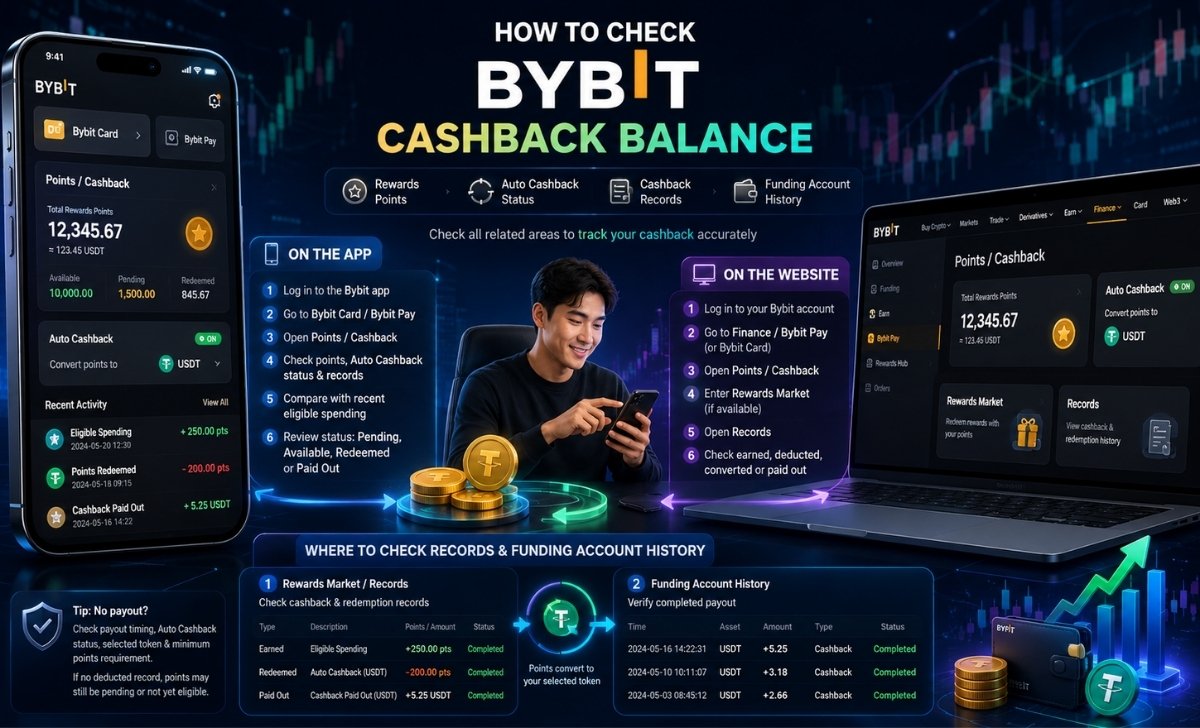
To begin, users should understand that Bybit cashback is usually connected to the rewards system. This means the visible balance may appear as points, redeemed cashback, deducted records, or funding account deposits. CashbackCoin recommends checking all related areas before assuming cashback has not been received.
Check Cashback Balance on Bybit App
The easiest way to check cashback on the Bybit app is to log in, open the Bybit Card or Bybit Pay area, and review the Points/Cashback section.
On mobile phones, users often want a fast answer after making a transaction. The app is suitable because it allows quick access to reward status, point records, and cashback activity. A practical checking flow includes:
- Log in to the Bybit app.
- Go to the Bybit Card or Bybit Pay section.
- Find the Points/Cashback dashboard.
- Check Rewards Points, Auto Cashback status, and records.
- Compare reward activity with recent eligible spending.
- Review whether the points are pending, available, redeemed, or already paid out.
The key point is that cashback may not show as a simple “cashback balance.” Instead, users may see Rewards Points first. If Auto Cashback is enabled, those points may later convert into the selected cashback token and appear in the Funding Account.
For CashbackCoin readers, the best habit is to check both the reward page and account history after each qualifying transaction. This prevents confusion between earned points, deducted points, and completed cashback payout.
Check Cashback Balance on Bybit Website
To check cashback on the Bybit website, users should log in, open the relevant finance or rewards section, then review Points/Cashback, Rewards Market, and Records.
The website view is useful when users want more details than the app can show quickly. For Bybit Pay cashback, the checking path may involve Finance, Bybit Pay, Points/Cashback, Rewards Market, and Records. The exact interface may vary by region, account type, or product availability, but the checking logic remains the same.
A practical desktop flow includes:
- Log in to your Bybit account.
- Go to Finance or the relevant Bybit Pay/Bybit Card section.
- Open the Points/Cashback dashboard.
- Enter Rewards Market if available.
- Open Records to review cashback or redemption activity.
- Check whether points were earned, deducted, converted, or paid out.
This process helps users separate three different states. First, points may be earned from eligible spending. Second, points may be deducted when they are redeemed or converted through Auto Cashback. Third, cashback may be credited to the Funding Account after conversion.
For users comparing app and website access, the app is better for quick checking, while the website is better for reviewing detailed records. CashbackCoin suggests using both when a payout seems missing.
Where to Find Cashback Records and Funding Account History
Users should check cashback records in the Rewards Market or Records section, then verify completed payout in Funding Account History.
This step matters because cashback may already be converted even if users no longer see points in the rewards page. Once points are deducted for cashback conversion, the record may appear under redemption or deducted activity. After that, the credited asset may appear in the Funding Account.
The two most important places to review are:
| Area to check | What users can confirm |
| Rewards Market / Records | Earned points, deducted points, redemption history, Auto Cashback records |
| Funding Account History | Cashback payout, credited token, deposit record, final received amount |
For example, if Rewards Points were deducted but the Funding Account does not show a matching deposit, users should check payout timing, Auto Cashback status, selected token, and minimum points requirement. If there is no deducted record, the points may still be pending or not yet eligible for conversion.
In short, checking Bybit cashback balance is not only about viewing one number. It is about connecting Rewards Points, redemption records, and Funding Account History into one complete reward trail.
How Bybit Rewards Points Work
Bybit Rewards Points are reward units earned from eligible activity and can be connected to cashback redemption, Auto Cashback, and Funding Account payout.

This matters because users who want to check bybit cashback balance may actually need to check Rewards Points first. Cashback becomes easier to understand when users know the difference between points earned, points pending, points available, and cashback already paid out.
For users researching how to get Bybit cashback, Rewards Points are the foundation because they show whether eligible activity has actually generated rewards before any payout appears.
Rewards Points vs Cashback Balance
Rewards Points are earned reward units, while cashback balance usually refers to the value users receive after points are redeemed or converted.
This distinction prevents a common misunderstanding. A user may complete an eligible transaction and expect to see cashback instantly. However, Bybit may first show the reward as points. These points may need to become available before they can be redeemed manually or converted automatically.
The difference can be understood like this:
| Term | Meaning |
| Rewards Points | Points earned from eligible Bybit activity |
| Pending Points | Points not yet available for redemption |
| Available Points | Points that can be redeemed or converted |
| Cashback Balance | Cashback value after conversion or payout |
| Funding Account Credit | Final credited cashback asset |
For example, a user may see 100 Rewards Points but no cashback payout yet. This does not always mean cashback is missing. It may mean the points are waiting for the next conversion cycle, have not met the minimum threshold, or are still pending.
CashbackCoin recommends treating Rewards Points as the first checkpoint and Funding Account History as the final confirmation point.
Bybit Card Rewards Points and Bybit Pay Rewards Points
Bybit Card and Bybit Pay may both generate rewards, but users should check the source of points to understand where cashback came from.
This source distinction is useful when users make different types of transactions. Spending through Bybit Card may create one reward trail, while activity through Bybit Pay may create another. Both can be related to rewards, but the conditions, timing, and visibility may not always be identical.
Users should review:
- Whether the reward came from Bybit Card spending.
- Whether the reward came from Bybit Pay spending.
- Whether the transaction type was eligible.
- Whether the points were added to total rewards.
- Whether points are separated by source in the records.
- Whether the points are available or pending.
This helps avoid a common error: checking only one product page and assuming all cashback should appear there. If the reward came from Bybit Pay, users should check the Bybit Pay rewards path. If it came from Bybit Card, users should review the card rewards section and related records.
For CashbackCoin readers who track multiple exchange rewards, organizing reward sources is important. Users should record the transaction date, product used, expected reward, and payout status to make later checking easier.
Pending Points and Available Points
Pending Points are rewards that have been recorded but are not yet ready for redemption, while Available Points can be used for cashback conversion.
This is one of the most important details when checking cashback balance. A user may see points in the account but still not receive cashback because those points have not become available. In this case, the issue is not necessarily a failed payout. It may simply be a waiting period.
Users should check three things:
- The date and time of the transaction.
- The status of the points.
- The expected availability or payout timing.
If points are pending, users should not expect immediate cashback. If points are available but not converted, users should check whether Auto Cashback is enabled. If points were deducted but no cashback appears, users should check Funding Account History and payout timing.
The basic flow is:
- Eligible transaction is completed.
- Rewards Points are calculated.
- Points may stay pending.
- Points become available.
- Points are redeemed manually or converted by Auto Cashback.
- Cashback is credited to the Funding Account.
Understanding this flow helps users diagnose reward status logically. Instead of asking only “Where is my cashback?”, users can ask “Which stage is my reward currently in?”
Bybit Cashback Payout Guide
Bybit cashback payout depends on point availability, Auto Cashback settings, minimum point requirements, selected token, and final credit to the Funding Account.
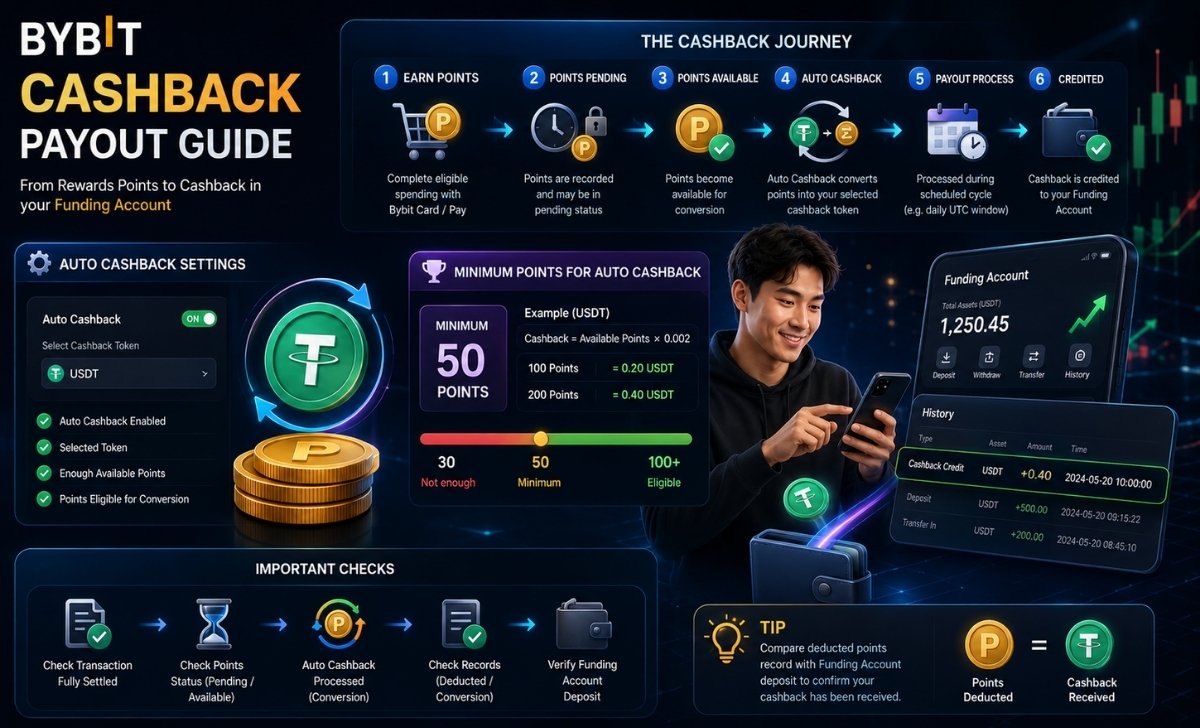
This section explains what happens after Rewards Points are earned. Once users understand the payout process, they can check whether cashback is still pending, waiting for conversion, already deducted, or already credited.
How Auto Cashback Converts Points Into Cashback
Auto Cashback converts eligible Rewards Points into the selected cashback token automatically when the required conditions are met.
This feature is useful because users do not need to redeem points manually each time. Once Auto Cashback is active, Bybit can convert accumulated points into the chosen cashback asset based on the program rules.
To use Auto Cashback effectively, users should check:
- Whether Auto Cashback is turned on.
- Which cashback token is selected.
- Whether the account has enough available points.
- Whether the points are eligible for conversion.
- Whether the conversion record appears in Records.
- Whether the payout appears in Funding Account History.
If Auto Cashback is disabled, users may still have Rewards Points but no automatic payout. In that case, the cashback balance may look incomplete because the points have not been converted yet.
CashbackCoin suggests reviewing Auto Cashback status whenever users notice available points but no payout. This simple check can solve many “cashback not showing” cases.
Minimum Points Required for Auto Cashback
Auto Cashback may require a minimum number of points before conversion, so users should check whether their available balance meets the required threshold.
This requirement explains why small rewards may not convert immediately. A user may earn points from eligible activity, but the system may wait until the minimum point amount is reached before processing Auto Cashback.
For Bybit Pay Auto Cashback, the outline notes a minimum of 50 points and a USDT cashback calculation based on accumulated points multiplied by 0.002. This type of rule is important because users may incorrectly assume every small point amount should create an instant payout.
A simple example:
| Available Points | Meets 50-point threshold? | Possible outcome |
| 20 points | No | Cashback may not convert yet |
| 50 points | Yes | Eligible for Auto Cashback if other rules are met |
| 100 points | Yes | May convert based on selected token and payout timing |
Users should also remember that available points and pending points are different. If an account shows 70 total points but only 30 available points, Auto Cashback may not trigger if the available amount does not meet the threshold.
This is why CashbackCoin recommends checking “available” status, not only total displayed rewards.
When Bybit Cashback Is Credited
Bybit cashback is credited after eligible points are converted, but the timing depends on product rules, pending status, and the Auto Cashback schedule.
Timing is often the main reason users think cashback is missing. A completed transaction does not always mean cashback is immediately available. Points may need to pass a pending period, then meet conversion requirements, then move through the payout process.
Users should check:
- Whether the transaction has fully settled.
- Whether points are still pending.
- Whether points have become available.
- Whether Auto Cashback has processed the conversion.
- Whether the selected token appears in Funding Account History.
For Bybit Pay Auto Cashback, the outline notes that redemption may occur daily during a specific UTC window, with crediting to the Funding Account afterward if Auto Cashback is enabled. For Bybit Card rewards, users should also consider the pending period before points become available.
Because timing may use UTC, users in other time zones should avoid checking too early. A user may complete a transaction today but only see the final cashback record after the system processes the reward cycle.
The best practice is to check the reward trail in this order: transaction date, points status, redemption record, and Funding Account deposit.
This process also helps users understand Bybit cashback withdrawal more clearly, because the final Funding Account deposit shows whether the converted cashback has actually been received.
Where Bybit Cashback Is Paid Out
Bybit cashback is usually paid out to the Funding Account after Rewards Points are converted into the selected cashback asset.
This final step confirms whether cashback has truly arrived. If users only check the Rewards Market, they may miss the final payout because the reward may have already moved into the Funding Account. That is why Funding Account History is essential.
Users should review:
- Funding Account balance.
- Funding Account History.
- Deposit or credit record related to cashback.
- Token type received.
- Time of credit.
- Amount received after conversion.
A useful checking method is to compare the deducted points record with the Funding Account deposit record. If points were deducted and a matching token credit appears, the cashback payout was completed. If points were deducted but no deposit appears, users should check processing time or contact support if the delay exceeds the expected window.
For CashbackCoin users, this final verification step is especially important when tracking multiple campaigns, exchange rewards, or referral-related cashback. Keeping a simple record of points earned, points deducted, and payout received helps users avoid confusion and manage crypto rewards more confidently.
Conclusion
Checking Bybit cashback balance requires more than opening one page. Rewards Points, pending status, Auto Cashback settings, redemption records, and Funding Account History
The most important point is simple: Rewards Points show what users have earned, while Funding Account History confirms what has actually been paid out. If cashback is not showing, users should check pending points, Auto Cashback status, minimum point requirements, selected token, and payout timing before assuming the reward is missing.
CashbackCoin helps users understand crypto cashback, exchange rewards, and payout tracking in a clearer way. Visit CashbackCoin to learn how to monitor rewards, compare cashback programs, and manage crypto benefits more effectively.

Darian Velmott is a Crypto Cashback Program Specialist at CashbackCoin, specializing in crypto cashback programs, trading fee rebates, referral rewards, and exchange cost optimization. He focuses on helping traders understand cashback opportunities across major exchanges including Binance, BingX, Bitget, Bybit, and Gate.io. His content covers cashback activation, rebate tracking, fee discount analysis, reward conditions, and practical guides for crypto traders.